Wednesday, December 16, 2015

5 Reasons to Use Info Graphics

Infographics are everywhere!  So why do people use them?  Check out this LearnDash article titled Reasons to Use Infographics in ELearning.

Reasons to Use Infographics in ELearning

Here's a sneak peak.

  1. Illustrating Statistics
  2. Eliminating Unnecessary Details
  3. When There's Too Much to Wrap Your Head Around
  4. Helping Two Ideas Meet
  5. Simplifying  a Process
Can Infographics help you?  Let's chat!

Tuesday, December 8, 2015

To This Day by Shane Koyczan

http://www.tothisdayproject.com 

One of my favorite spoken word poets.  The power of the words and the animation are moving.


Saturday, November 28, 2015

Getting started with Office 365

Almost every school district is moving to Microsoft Office 365. Here are some tips and tricks to get you started.

Word tips

11. Read more easily
Word's new-look Read Mode (under the View tab) makes browsing documents easier, and it supports touchscreen input too.
12. Embed videos

50 handy Office 2013 tips tricks and hints
Drop YouTube videos in and play them from Word

Load in online video clips from YouTube and elsewhere using the new Online Video button under the Insert tab.
13. Define words
Right-click on a word and choose Define to pick a dictionary and see its definition. You can even get help with pronunciation if you need it.
14. Reply to comments
Word 2013 enables you to reply to document comments, and even mark them as 'done', for a smoother workflow.
15. Get better borders

50 handy Office 2013 tips tricks and hints
Quickly copy border formatting with the Border Painter tool

Table borders have been given some love in Word 2013, with additions such as the Border Painter tool (for copying border formatting), which is under the Design section of the Table Tools tab.
16. Edit PDFs
Fully fledged PDF editing finally arrives with Word 2013, though you might lose some layout settings. Edited documents can be saved as PDF or DOCX files.

17. Change the defaults
New documents use Calibri and double spacing by default. Change this by right-clicking on the Normal stylesheet icon and choosing Modify.
18. Benefit from live alignment
Click and drag and object on the page and you'll see faint green marker lines appear, DTP-style, enabling you to line up a series of elements more easily.

Tuesday, November 3, 2015

The Island of Dr. Libris by Chris Grabenstein


Gr 4–7—Billy is not thrilled to be spending the summer in a cabin on a lake in the middle of nowhere. His mom and dad aren't together, and he's worried this change may be permanent. Their cabin is owned by Dr. Libris, who also owns the mysterious island in the lake. With a lack of technology, and bullies as neighbors, Billy resorts to searching for a key to open the bookcase in Dr. Libris' study. What he unlocks brings classic books to life—when he reads the books, he hears the action somehow occurring on the island. Curious, he ventures out to the island to explore and discovers the unbelievable—somehow the stories he is reading are actually happening. When he meets Hercules, Zeus, Robin Hood, Tom Sawyer, and others, he becomes embroiled in their adventures and unwittingly causes the storylines to collide. When Billy brings his neighbors, Walter, and Walter's sister, out to the island, they all face treacherous foes including the giant from Jack in the Beanstalk and a space lizard from Walter's comic book. Billy is left trying to figure out whether Dr. Libris is behind everything, whether his own mind may be the culprit, and whether or not he can use the island to help save his parents' marriage. While the plot is unique, the story feels too far-fetched to be believable, and lacks the magic of Grabenstein's Escape from Mr. Lemoncello's Library (Random, 2013).—Michele Shaw, Quail Run Elementary School, San Ramon, CA --This text refers to the Library Binding edition.

Monday, October 12, 2015

Code.org

Code.org® is a non-profit dedicated to expanding access to computer science, and increasing participation by women and underrepresented students of color. Our vision is that every student in every school should have the opportunity to learn computer science. We believe computer science should be part of core curriculum, alongside other courses such as biology, chemistry or algebra.

https://studio.code.org/s/frozen/stage/1/puzzle/1

Thursday, October 8, 2015

Shake up learning

Here's a big shout-out to Kasey Bell, whose blog Shake Up Learning has some of the best technology tutorials on the web! She has Google resources, mobile learning, edcamp, blended learning and more.

http://www.shakeuplearning.com/

Saturday, September 26, 2015

Book Club - Al Capone Shines My Shoes by Gennifer Choldenko

What do you do when your neighbors are a bunch of hit men, con men, and mad dog murderers? Well, if you're Moose Flanagan, you ask the most notorious convict of them all, Al Capone, for help. But when that convict comes through for you and then asks you for a favor in return. Suddenly it's a whole different ball game. Picking up where the Newbery Honor winning Al Capone Does My Shirts left off, this lively second romp featuring Moose, his friends, and some of Alcatraz's "finest" is just as satisfying as the first.

This is the book the kids are reading in book club.  The kids are really getting into this historical fiction book.  Living on an island with gangsters is interesting.  The know there will be a catch.  What does Al Copone want for a favor from Moose?  Hmmm we shall see.

Monday, September 21, 2015

Escape from Mr. Lemoncello's Library by Chris Grabenstein

What I am reading now.  Gr 4–8—The world's most famous game maker, Luigi Lemoncello, has just designed a brand-new, state-of-the-art library in his hometown, and he's invited 12 lucky seventh graders to stay the night just before its grand opening. Avid gamer Kyle Keeley jumps at the chance to meet his idol and see a real live library. After the previous library's demolition, this is the first library this small town has had in 12 years. Kyle is elated when his essay is chosen, and he gets to be among the first to wander the halls of one of the most interactive libraries ever. Kyle and the other contestants have 24 hours to find a secret exit out of the building and win a spectacular prize, and when the doors shut, the games really begin. Love of literature is a must if you want to escape. Librarians will fall in love with Mr. Lemoncello's library. This title is filled to the brim with witty literary references, an education on the Dewey Decimal System, and zany word puzzles. Narrator Jesse Bernstein expertly brings to life each character from the whimsical Lemoncello to the pretentious bully Charles Chillington. Insatiable readers who pick up on all the references will adore this book, as will general puzzle and mystery enthusiasts. The antics are similar to Patrick Carman's Floors while the puzzles are relatable to Blue Balliet's Chasing Vermeer.

Friday, September 18, 2015

http://goformative.com/

Formative

http://goformative.com/

Create incredible online assessments, classwork or homework.

Beyond Multiple Choice

Students can type, show their work with drawings or submit images.

Formative Everything

Frequent formal and informal checks for understanding guarantee student growth.

Real-Time Intervention

Know exactly what each student needs as they learn and take immediate actions.

Wednesday, September 16, 2015

Socrative.com

Socrative lets teachers engage and assess their students with educational activities on tablets, laptops and smartphones. Through the use of real time questioning, instant result aggregation and visualization, teachers can gauge the whole class’ current level of understanding. Socrative saves teachers time so the class can further collaborate, discuss, extend and grow as a community of learners.

Thursday, September 10, 2015

Easel.ly


What is Easel.ly?
Easel.ly is an easy-to-use infographic creator.  Infographics include flowcharts and visual aids that elaborate on a particular subject and make it more attractive for the student to understand and/or learn.

How can I use Easel.ly in my classroom?
        Have students present a topic or an issue through an infographic.
        Encourage the students to create a timeline infographic. It’s a great way to remember important historical events.
        Ask students to present the past, and present of a place using a map and other graphics.
        Ask students to use an infographic to present a news article or even a book review.
        The possibilities are endless. Infographics can be used in every subject in so many creative ways to bring life to your curriculum.

Show me some examples of Easel.ly!
        Nerds vs Geeks
        Top Songs 1940 - 2010
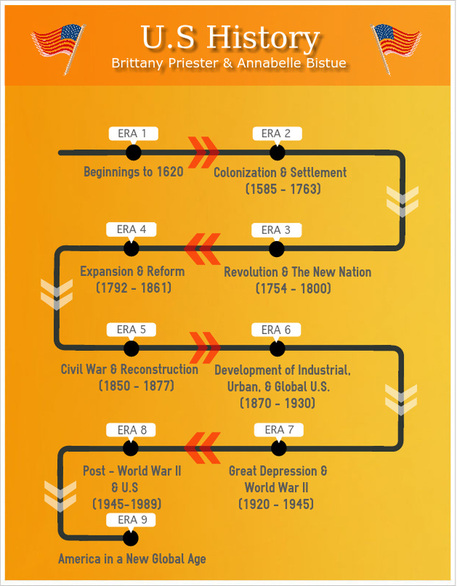
        US History
        Smart Teaching
        Managing a Classroom

I need this! How do I use Easel.ly?
        Here’s a quick video tutorial you can share with our students.
     Easel.ly
        If you like the paper how-to, check this out.

     How to Use Easel.ly

Tuesday, September 1, 2015

Plickers


What is Plickers?
Love the old individual whiteboards that students held up with answers?  Here’s a new techie spin called Plickers!  You can think of Plickers as paper clickers; it’s a neat student response system that uses a teacher's iPad or Android tablet in conjunction with a series of QR codes to create a student response system. Students are given a set of QR codes on large index cards. The codes are assigned to students. Each code card can be turned in four orientations. Each orientation provides a different answer. When the teacher is ready to collect data, he or she uses the Plickers mobile app to scan the cards to see a bar graph of responses.

Check out this fun 40 second video.  :)
https://youtu.be/mI-eBHhEqzs

How can I use Plickers in my classroom?
     Quickly take the pulse of a class before, during, and after a lesson.
     Exit ticket
     Reading homework check
     Class polls or making class decisions
     Review game
     Take attendance

Show me some examples of Plickers!
     Plickers!

I need this! How do I use Plickers?
     Here’s a quick video tutorial you can share with our students.
Plickers Tutorial

     You can also check out the help menu on Plickers site

Monday, August 24, 2015

What is Kahoot?


What is Kahoot?
Kahoot is a game-based classroom response system that allows students to respond from the web on any electronic device that has Internet access. Teachers can ask thought provoking questions which motivate participation through game-based learning and rewards in a social setting. Your Kahoot questions can include pictures and videos. As the teacher you can control the pace of the Kahoot quiz or survey by imposing a time limit for each question. As students answer questions they are awarded points for correct answers and the timeliness of their answers. A scoreboard is displayed on the teacher's screen.

How can I use Kahoot in my classroom?
      Review & reinforce knowledge
      Quiz students about flipped lessons/videos
      Submit exit tickets/informal feedback to check what students have learned
      Introduce a new concept or topic
      Encourage reflection and peer-led discussion
      Connect to classrooms around the world
      Challenge learners to make their own Kohoots

Show me some examples of Kahoot!
Set up a Kahoot account to view these samples.  You will have to be both the teacher and student in these Kahoots. 

I need this! How do I use Kahoot?
      Here’s a couple of quick video tutorials for using Kahoot.
    Create a Kahoot

      You can also check out Kahoot’s User Guide

Monday, May 25, 2015

EduCanon

What is eduCanon? eduCanon is a free service for creating, assigning, and tracking your students' progress on flipped lessons. eduCanon allows you to build flipped lessons using videos from a variety of  sources including YouTube, Vimeo, and TeacherTube. You can create questions to appear while
your students are watching videos that you have assigned to them in your eduCanon online classroom. In the video embedded below I provide a demonstration of how to create a lesson in eduCanon.

How can I use eduCanon in my classroom?

● Turn YouTube and other video sources into a classroom.
● Embed questions at specific points
● Monitor student results
● Add explanations that pop up when students answer
● Allows for retakes
● Students can type a reason why the answer is correct after retakes
● Embed your finished videos into your Learning Hub course for easy access

Show me some examples of eduCanon!
● Here’s eduCanon’s Library! Take a look; there’s something for every subject!

I need this! How do I use eduCanon?
● Here’s a quick video tutorial you can share with our students.

How to Build Flipped Lessons on eduCanon
● You can also check out this eduCanon User Guide. Want even more information and to talk about integrating

Tuesday, May 19, 2015

Text Compactor

Here's a cool little tool to use with your struggling readers.  You could also just use it to save some time when you need to quickly read something.  Copy and paste some text into the compactor and adjust the percentage of text to keep for a shorter read.  This could help you and your students focus in on what's important.  Give it a shot and see what you think!

TextCompactor
http://textcompactor.com/


Wednesday, May 13, 2015

Rubistar - Easiest way to make rubrics

RubiStar does away with the tedium of creating rubrics from scratch by allowing you to customize one of our many template rubrics. You can use the rubrics as is, or modify the templates to better serve your particular students' needs. You can choose from six skill categories: Multimedia, Products, Experiments, Oral Projects, Research and Writing, and Work Skills. You can see these topics and the available rubrics below.

Choosing a customizable rubric


To begin making your rubric, select one of the projects under the six main headings. In the image below, the topic Research and Writing,Research Report is selected.

Click "d" for text-only version.

Monday, May 4, 2015

Checkout PBS Learning Media!

This could be a fabulous resource for all subject areas!

PBS LearningMedia announced that it now offers more than 100,000 digital resources available to PreK-12 educators nationwide. Since its launch in 2011, PBS LearningMedia has continued to actively expand its offerings of education content that appeals to digital native students. Resources are available in English and Spanish, and are aligned to National and Common Core State Standards.

Find out more here!

Go check it out here!
http://www.pbslearningmedia.org/


Wednesday, April 29, 2015

What I am reading - Rump


Rump by Liesl Shurtliff

In a magic kingdom where your name is your destiny, 12-year-old Rump is the butt of everyone's joke. But when he finds an old spinning wheel, his luck seems to change. Rump discovers he has a gift for spinning straw into gold. His best friend, Red Riding Hood, warns him that magic is dangerous, and she’s right. With each thread he spins, he weaves himself deeper into a curse.

To break the spell, Rump must go on a perilous quest, fighting off pixies, trolls, poison apples, and a wickedly foolish queen. The odds are against him, but with courage and friendship—and a cheeky sense of humor—he just might triumph in the end.

A Texas Bluebonnet Master List Selection, Rump is perfect for fans of Gail Carson Levine's Ella Enchanted or Adam Gidwitz's A Tale Dark and Grimm.

"Lighthearted and inventive, Rump amusingly expands a classic tale." —Brandon Mull, #1 New York Times bestselling author of Fablehaven.

Sunday, April 26, 2015

13 Reasons Your Brain Craves Infographics

Infographics are all the rage. You see them everywhere. Here is a cool infographic about why your brain craves infographics!  :)
13 Reasons Your Brain Craves Infographics

Here is Kathy Schrock's guide to infographics. Here you can find info on creating infographics and tools you can use to create infographics.
http://www.schrockguide.net/infographics-as-an-assessment.html

How can we harness this information to create cool student projects? What tools can we use to help students extrapolate information and turn it into something that is meaningful for them and others Let's chat and figure out the answers to these questions!

Monday, April 20, 2015

A Poem in Your Pocket, by Margaret McNamara & G. Brian Karas


Poetry encourages us to see the world through a different lens, slowing down to notice small details. But how do you encourage a child who's feeling absolutely stuck, unable to let go enough to trust their own "poet's eye"? This delightful new picture book offers a gentle lesson on how a special teacher and a visiting poet did just that.